shoutmix


ShoutMix chat widget

This is default featured post 1 title

Go to Blogger edit html and find these sentences.Now replace these sentences with your own descriptions.This theme is Bloggerized by Lasantha Bandara - Premiumbloggertemplates.com.

This is default featured post 2 title

Go to Blogger edit html and find these sentences.Now replace these sentences with your own descriptions.This theme is Bloggerized by Lasantha Bandara - Premiumbloggertemplates.com.

This is default featured post 3 title

Go to Blogger edit html and find these sentences.Now replace these sentences with your own descriptions.This theme is Bloggerized by Lasantha Bandara - Premiumbloggertemplates.com.

This is default featured post 4 title

Go to Blogger edit html and find these sentences.Now replace these sentences with your own descriptions.This theme is Bloggerized by Lasantha Bandara - Premiumbloggertemplates.com.

This is default featured post 5 title

Go to Blogger edit html and find these sentences.Now replace these sentences with your own descriptions.This theme is Bloggerized by Lasantha Bandara - Premiumbloggertemplates.com.

Minggu, 22 Januari 2012

review sennheiser-px-100

http://www.head-fi.org/t/498027/sennheiser-px-100-ii-review-pics

Hi guys, to quickly introduce myself, I am quite new to the whole audiophile world. I don't consider myself as one, just a person who likes products that fulfill my needs and give the best quality for the money (Since nowadays, you wanna save a penny if you can).

Now, before I start, I'd like to mention that the only types of audio equipment I have ever owned are the Koss Porta Pros (newest version I believe), Sony headphones (with my walkman 6 years ago xD), Logitech Headset, Logitech X-530, Zune, Ipod Touch 3g(I use now), and Creative X-Fi sound card.

Over the years I have also became "bass" prone. I love songs with tons of bass, and the presence of bass guitars playing. However the music I listen to is practically everything ranging from rock, rap, pop, r&b, reggaeton, electronica, country, classical, the whole 9 yards.

So here it is, at the store (Saturn) I stumbled across some Sennheiser headphones and stopped at the PX100s and the PX100-IIs. I have heard alot about the PX100s being great for portability and sound quality, also on the spot I tested the PX100s they had on the wall. I instead opted for the PX100-IIs since I would assume they would be better, even though they didn't have them to sample. For a little more Euros, it was a choice that didn't break my wallet.

They came in a nice compact package like this.

Headphones 001.jpg

The box was smaller than the ones from the PX100s, and included a pouch instead of a plastic case seen here.

Headphones 003.jpg

The only headphones that I can compare these with are the Koss Porta Pros, so I'll mention those every once in awhile.

Sound:
Right away fresh from the box I noticed the bass was very obvious, even more than the PX100s I have tested at the store. The initial listening experience was just bass to me with mids and treble kinda there, so I let a few minutes of songs go through to warm up the drivers. Right through watching the FIFA 2010 World Cup (England vs Algeria ;D), all the frequencies came out beautifully! I heard sounds (instruments, etc) that I haven't heard before. I was already blown away by the Porta Pros, but these PX100-IIs added an extra layer of detail to the mix. So that was a nice surprise. At this point, the PPs in comparison had more sparkly highs and a bit better 3d soundstage. The PX100s at the store were also more on the treble side. The PX100-IIs beats them in mids and lowish lows? and bass. I would assume from the mods I have read, adding HD414s big yellow fluffy earpads would bring out the highs more all for a low price.

Comfort:
Alright, this mostly applies for people with watermelon heads like mine, but I found these to be less comfortable than the Porta Pros. Initially they were great, but after like 45mins my ears start to hurt. The padding on top are nice though, and sit great. The Porta Pros definitely win in this department, since 1. They have the comfort setting 2. is more flexible, less rigid, and the speakers move more freely. So I was able to wear the PPs for hours on end. I can't say for the PX100s since I only had them on for 2 sample songs.

Durability:
Just by looking at the PX100-IIs at first sight, they look more sturdier than the PX100 and PPs. They are also heavier than both, but still light in terms of being a portable headphone. If anything happens, you have the 2 year warranty to back you up, though Koss gives you a lifetime warranty.

Extras:
These only came with a pouch, instead of the traditional plastic "ritual" case. As much as I like the plastic case, the pouch was not bad at all either. I was able to fit the headphones, my ipod touch, and IEM all in there.
In comparison to the PPs, they also give you a pouch, but also an adapter for the big equipment. The pouch for the PP is rather small, and I always found it tricky to put the cans in, despite making the PPs as small as possible.

Conclusion:
Well there it is guys. Hopefully over time when burning them in, I would get even more out of these headphones. But still I believe for this price point you simply can't go wrong. Simply fantastic for mp3 players such as my Ipod Touch. You can also use them for gaming, I used these with COD4. Though I think the PPs had more of a 3D feel as mentioned be4 and the volume was more sensitive.
Headphones 002.jpg

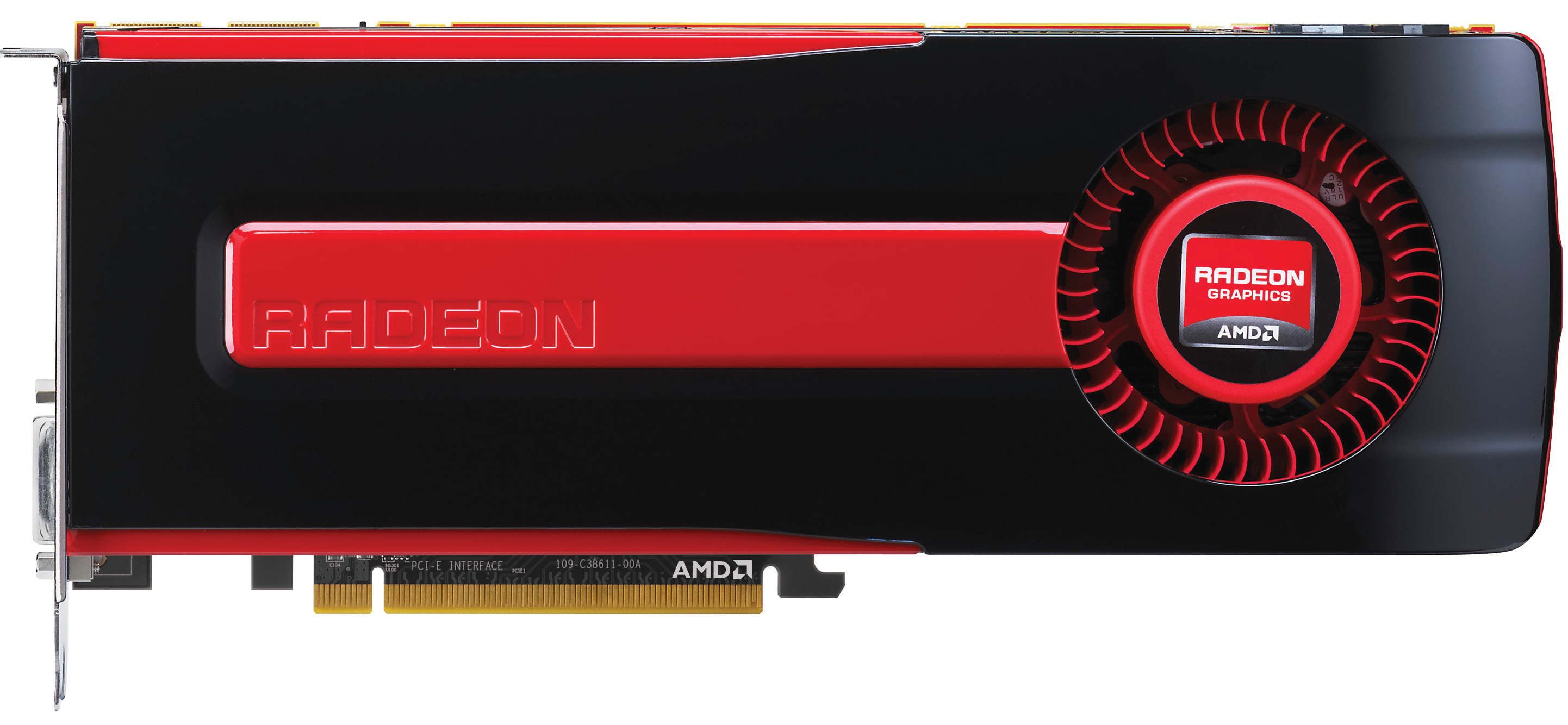
review amd 7970 vga card

 http://www.anandtech.com/show/5261/amd-radeon-hd-7970-review

While AMD and NVIDIA are consistently revising their GPU architectures, for the most part the changes they make are just that: revisions. It’s only once in a great while that a GPU architecture is thrown out entirely, which makes the arrival of a new architecture a monumental occasion in the GPU industry. The last time we saw this happen was in 2006/2007, when unified shaders and DirectX 10 lead to AMD and NVIDIA developing brand new architectures for their GPUs. Since then there have been some important revisions such as AMD’s VLIW4 architecture and NVIDIA’s Fermi architecture, but so far nothing has quite compared to 2006/2007, until now.

At AMD’s Fusion Developer Summit 2011 AMD announced Graphics Core Next, their next-generation GPU architecture. GCN would be AMD’s Fermi moment, where AMD got serious about GPU computing and finally built an architecture that would serve as both a graphics workhorse and a computing workhorse. With the ever increasing costs of high-end GPU development it’s not enough to merely develop graphics GPUs, GPU developers must expand into GPU computing in order to capture the market share they need to live well into the future.
At the same time, by canceling their 32nm process TSMC has directed a lot of hype about future GPU development onto the 28nm process, where the next generation of GPUs would be developed. In an industry accustomed to rapid change and even more rapid improvement never before have GPU developers and their buyers had to wait a full 2 years for a new fabrication process to come online.
All of this has lead to a perfect storm of anticipation for what has become the Radeon HD 7970: not only is it the first video card based on a 28nm GPU, but it’s the first member of the Southern Islands and by extension the first video card to implement GCN. As a result the Radeon HD 7970 has a tough job to fill, as a gaming card it not only needs to deliver the next-generation performance gamers expect, but as the first GCN part it needs to prove that AMD’s GCN architecture is going to make them a competitor in the GPU computing space. Can the 7970 do all of these things and live up to the anticipation? Let’s find out…

AMD GPU Specification Comparison
  AMD Radeon HD 7970 AMD Radeon HD 6970 AMD Radeon HD 6870 AMD Radeon HD 5870
Stream Processors 2048 1536 1120 1600
Texture Units 128 96 56 80
ROPs 32 32 32 32
Core Clock 925MHz 880MHz 900MHz 850MHz
Memory Clock 1.375GHz (5.5GHz effective) GDDR5 1.375GHz (5.5GHz effective) GDDR5 1.05GHz (4.2GHz effective) GDDR5 1.2GHz (4.8GHz effective) GDDR5
Memory Bus Width 384-bit 256-bit 256-bit 256-bit
Frame Buffer 3GB 2GB 1GB 1GB
FP64 1/4 1/4 N/A 1/5
Transistor Count 4.31B 2.64B 1.7B 2.15B
Manufacturing Process TSMC 28nm TSMC 40nm TSMC 40nm TSMC 40nm
Price Point $549 $350 $160 -
The Radeon HD 7970 is a card of many firsts. It’s the first video card using a 28nm GPU. It’s the first card supporting Direct3D 11.1. It’s the first member of AMD’s new Southern Islands Family. And it’s the first video card implementing AMD’s Graphics Core Next architecture. All of these attributes combine to make the 7970 quite a different video card from any AMD video card before it.
Cutting right to the chase, the 7970 will serve as AMD’s flagship video card for the Southern Islands family. Based on a complete AMD Tahiti GPU, it has 2048 stream processors organized according to AMD’s new SIMD-based GCN architecture. With so many stream processors coupled with a 384bit GDDR5 memory bus, it’s no surprise that Tahiti is has the highest transistor count of any GPU yet: 4.31B transistors. Fabricated on TSMC’s new 28nm High-K process, this gives it a die size of 365mm2, making it only slightly smaller than AMD’s 40nm Cayman GPU at 389mm2.
Looking at specifications specific to the 7970, AMD will be clocking it at 925MHz, giving it 3.79TFLOPs of theoretical computing performance compared to 2.7TFLOPs under the much different VLIW4 architecture of the 6970. Meanwhile the wider 384bit GDDR5 memory bus for 7970 will be clocked at 1.375GHz (5.5GHz data rate), giving it 264GB/sec of memory bandwidth, a significant jump over the 176GB/sec of the 6970.
These functional units are joined by a number of other elements, including 8 ROP partitions that can process 32 ROPs per clock, 128 texture units divided up among 32 Compute Units (CUs), and a fixed function pipeline that contains a pair of AMD’s 9th generation geometry engines. Of course all of this hardware would normally take quite a bit of power to run, but thankfully power usage is kept in check by the advancements offered by TSMC’s 28nm process. AMD hasn’t provided us with an official typical board power, but we estimate it’s around 220W, with an absolute 250W PowerTune limit. Meanwhile idle power usage is looking particularly good, as thanks to AMD's further work on power savings their typical power consumption under idle is only 15W. And with AMD's new ZeroCore Power technology (more on that in a bit), idle power usage drops to an asbolutely miniscule 3W.
Overall for those of you looking for a quick summary of performance, the 7970 is quite powerful, but it may not be as powerful as you were expecting. Depending on the game being tested it’s anywhere between 5% and 35% faster than NVIDIA’s GeForce GTX 580, averaging 15% to 25% depending on the specific resolution in use. Furthermore thanks to TSMC’s 28nm process power usage is upwards of 50W lower than the GTX 580, but it’s still higher than the 6970 it replaces. As far as performance jumps go from new fabrication processes, this isn’t as big a leap as we’ve seen in the past.
In a significant departure from the launch of the Radeon HD 5870 and 4870, AMD will not be pricing the 7970 nearly as aggressively as those cards with its launch. The MSRP for the 7970 will be $550, a premium price befitting a premium card, but a price based almost exclusively on the competition (e.g. the GTX 580) rather than one that takes advantage of cheaper manufacturing costs to aggressively undercuts the competition. In time AMD needs to bring down the price of the card, but for the time being they will be charging a price premium reflecting the card’s status as the single-GPU king.
For those of you trying to decide whether to get a 7970, you will have some time to decide. This is a soft launch; AMD will not make the 7970 available until January 9th (the day before the Consumer Electronics Show), nearly 3 weeks from now. We don’t have any idea what the launch quantities will be like, but from what we hear TSMC’s 28nm process has finally reached reasonable yields, so AMD should be in a better position than the 5870 launch. The price premium on the card will also help taper demand side some, though even at $550 this won’t rule out the first batch of cards selling out.
Beyond January 9th, AMD as an entire family of Southern Islands video cards still to launch. AMD will reveal more about those in due time, but as with the Evergreen and Northern Islands families AMD has a plan to introduce a number of video cards over the next year. So 7970 is just the beginning.
Winter 2011 GPU Pricing Comparison
AMD Price NVIDIA
  $750 GeForce GTX 590
Radeon HD 6990 $700  
Radeon HD 7970 $549  
  $500 GeForce GTX 580
Radeon HD 6970 $350 GeForce GTX 570
Radeon HD 6950 2GB $250  
  $240 GeForce GTX 560 Ti
Radeon HD 6870 $160  
 

review bb onyx 3

http://www.hparena.com/wp-content/uploads/2011/11/BlackBerry-Bold-9790-aka-Onyx-3.jpg
Selamat malam para kompasianer. Ini adalah review saya yang ketiga,sebelumnya saya telah mereview perbandingan antara blogspot vs tumblr , bisa di baca di http://teknologi.kompasiana.com/internet/2012/01/03/review-blogspot-tumblr/ , dan review saya yang kedua tentang Blackberry Messenger terbaru v6.1.0.49 , bisa di baca di http://teknologi.kompasiana.com/gadget/2012/01/11/review-blackberry-messenger-v61049/ .
Hari ini saya ingin mereview tentang Blackberry yang sempat menjadi masalah di Indonesia,yakni Blackberry Bellagio .
Saya sempat merasakan mempunyai blackberry yang satu ini. Well,sebenarnya blackberry ini mempunyai keuinikan sendiri, yaitu body nya yang tipis , keyboard yang lebih empuk daripada Blackberry Onyx 2 ( delta ). Serta RAM yang cukup besar , yaitu 768 MB , memungkinkan untuk men-download aplikasi yang lumayan banyak. Selain itu Blackberry Bellagio ini di perkuat dengan OS 7 , OS terbaru dari RIM .
Tapi ada beberapa kekurangan nya , yaitu karena body nya yang tipis , maka baterai pun cepat menjadi panas . Saya sempat mendiamkan blackberry itu selama 30 menit,dan karena ada BBM yang masuk,Blackberry saya menjadi sangat panas. Saya sangat kaget mengetahui hal ini. Selain itu bila di pasang pada mode 3G , Blackberry Bellagio sangat cepat berkurang baterai nya . Dalam 1 jam berkurang 10% . Padahal waktu saya memakai onyx 2 , 1 jam hanya berkurang 5% paling banyak .
Kelemahan lain yang sangat di sayangkan , OS 7 belum sepenuhnya stabil. OS 7 untuk Blackberry Bellagio selalu di update setiap hari nya. Berbeda dengan blackberry yang lain , yang mungkin hanya sebulan sekali mengalami update. Lalu seperti yang saya bilang,blackberry ini sangat tipis,sehingga bila tangan anda licin,blackberry ini akan dengan mudahnya merosot dari tangan anda. Seperti yang di alami teman saya. Tapi untungnya , hanya mengalami lecet sedikit.
Bagi anda yang sudah terlanjur beli,dan ingin menjualnya kembali,ada baiknya anda pikir-pikir ulang. Karena dengan pengalaman saya,harga jual nya ke toko jauh lebih rendah. Bayangkan,baru sehari di pakai,saya jual kembali , harganya turun menjadi cukup jauh ( spesifikasi harga bisa di lihat di bawah ) .
Jadi,silahkan di pikir ulang bagi anda yang ingin membeli Blackberry Bellagio .
Spesifikasi Blackberry Bellagio:
* Height 4.33 inches
* Width 2.36 inches
* Thickness 0.45 inches
* Weight 0.24 pounds
* Form factor Slab
* Primary orientation Portrait
* Color Black
* Physical keypad QWERTY
* Loudspeaker Yes
* Screen size (diagonal) 2.44 inches
* Resolution (Y) 360 px
* Resolution (X) 480 px
* Touchscreen type Capacitive
* Multitouch Yes
Konektifitas BlackBerry Bold 9790 Bellagio
* 3G Connectivity Yes
* GSM Yes
* UMTS / HSPA Yes
* Wi-Fi Yes
* Wi-Fi support 802.11n, 802.11g, 802.11b, 802.11a
* GPS Yes
* Bluetooth Yes
* NFC support Yes
Kamera BlackBerry Bold 9790 Bellagio
* Resolution 5 megapixels
* Flash Single LED
* Focus type Autofocus
* Video resolution VGA
Isi BB Bellagio
* Manufacturer Marvell
* Clock speed 1 GHz
* RAM size 768 MB
Penyimpanan BB Bellagio 9790
* Internal size 8 GB
* External Yes
* Max external size 32 GB
* External type microSD
Harga Baru BlackBerry 9790 Bellagio : Rp. 4.350.000 ( Garansi TAM per 14 Januari 2012 )
Harga Second BlackBerry 9790 Bellagio : Rp. 3.600.000 ( per 15 Januari 2012 )
Semoga informasi saya berguna untuk kita semua :)

http://teknologi.kompasiana.com/gadget/2012/01/18/review-blackberry-onyx-3-bellagio/

ciri rusak komputer secara umum

Ada beberapa ciri kerusakan pada Laptop yang biasanya kita jumpai. Dengan membuat alur dalam menentukan jenis kerusakan tentunya akan mempermudah untuk memperbaiki kerusakan secara cepat. Apa saja ciri-ciri kerusakan laptop / notebook ?

Biasanya ada beberapa ciri-ciri kerusakan laptop / notebook yang dapat kita jumpai sebagai tahapan awal servis laptop / notebook, yaitu antara lain :

Ciri Kerusakan LCD Laptop / Notebook :

Layar tidak tampil gambar, menyala tapi keluar garis-garis vertikal, tampak blok hitam, dan gambar tidak simetris / acak.
Solusi : coba cek dulu konektor ataupun soket-soket yg berhubungan dengan monitor.

Ciri Kerusakan Keyboard Laptop / Notebook :

Beberapa tuts tidak berfungsi, keluar bunyi beep panjang pada saat laptop dinyalakan, cursor berjalan tidak stabil / bergerak sendiri.
Kerusakan yang lebih parah : biasanya konslet dan ini menyebabkan Laptop / Notebook setelah booting, restart-restart terus.

Ciri Kerusakan Memory Laptop / Notebook :
Pada saat dihidupkan tidak tampak tampilan sama sekali, blue screen pada saat mulai loading Operating System. Bisa juga keluar suara beep berulang-ulang.
Ciri Kerusakan Motherboard / IC regulator Laptop / Notebook :
Dihidupkan agak sulit, batere tidak mau discharge, Mati Total. Indikator charger nyala, setelah dicarge lampu indikator pada charger mati (konslet). Jadi terjadi arus balik pada powernya. Kerusakan ini sering terjadi.

Ciri Kerusakan Charger Laptop / Notebook :
Batere tidak mau di charge, tidak ada indikator masuk power, laptop di charge posisi hidup malah kemudian mati. Layar bergetar tidak stabil.
Ciri Kerusakan DVD / CD room Laptop / Notebook :
Tidak mau membaca CD, indikator CD off.
Ciri Kerusakan Hardisk Laptop / Notebook :
Loading data / System lambat, berbunyi tidak normal, tidak bisa masuk windows, belum sampai login windows sudah restart sendiri.
Ciri Kerusakan Chipset / VGA Laptop / Notebook :
Layar tidak tampil, kalaupun tampil tidak mau akses ke Bios. Ada terdengar suara beep secara beraturan.
Penjelasan di atas merupakan cirri-ciri kerusakan yang sering terjadi pada laptop / notebook secara hardware.
Sedangkan ciri-ciri kerusakan laptop / notebook secara software antara lain :
1. Tidak mau booting ke OS
2. Pada Loading awal desktop banyak informasi error
3. Proses Loading sangat Lambat
4. Tidak bisa membuka Aplikasi
5. Flasdisk Tidak bisa di baca
6. Folder Option pada Explorer Tidak bisa di buka
7. File regedit tidak bisa di eksekusi
Demikian ciri-ciri kerusakan laptop / notebook, dan sebenarnya ini juga berlaku untuk PC biasa atau komputer desktop biasa.

PSVITA review

PS Vita takes on Android, iOS and Nintendo's 3DS in our UK console review – but is this the real competition for Sony's new PlayStation?

Published on Jan 11, 2012
A glance at the PS Vita’s specifications and software line-up will have most tech and game heads salivating at the prospect of playing handheld games PS Vita-style: a quad-core processor, an OLED screen, super-quick graphics, all the controls you could wish for… and games like Uncharted, WipEout, FIFA and Call Of Duty either out at launch or coming soon.

So on paper it looks good for the PS Vita. But a less than spectacular Japanese launch late last year suggests that PS Vita has yet to capture gamers’ imaginations. Why? A resurgent 3DS (now with Mario and Monster Hunter) and a general move in the market from expensive triple-A games to cheap smartphone game apps could go some way to explain why.

Is this the right time for the PS Vita? Is there room for a high-end, triple-A game playing handheld games console in today’s market?

The PS Vita home screen. XMB has been abandoned for this smartphone-like interface.

PS Vita user interface and OS

We live in a technological world where software is king. It’s a world where everyone has pretty much the same hardware; specifications-wise, there’s not much difference between an iPhone 4S and a Samsung Galaxy S2. The real difference is in the OS – iOS is more competent than Android, therefore the iPhone 4S is a better phone.

But we also live in a world where everyone is suing everyone else for some patent infringement or other so we suspect that a lot of Sony’s design decisions were borne of wanting an UI that’s familiar to smartphone users but not wanting to spend months and millions battling expensive litigation.

Take the PS Vita’s home screen, for example. It apes smartphone app layout but substitutes square icons with bubbles. These bubbles are navigated vertically rather than horizontally; they can be rearranged by holding down on one then dragging and dropping it in the desired location. It’s fine, but lacks the fluidity, polish and folder options of other, more established OS.

All open apps can be displayed and accessed quickly by tapping the PS button.
However, PS Vita’s weakness is through its dependence on its every-function-is-done-through-an-app design. Connect the PS Vita to a PC or PS3 for content transferring – you can transfer photos, videos and PS Vita/PSP games and saves – and the issue really comes to light.

Instead of a simple drag and drop interface, all content management is done through the PS Vita and its Content Management app. If you want to transfer some photos, for example, you select the option and this then opens the Photo app. From here you select your photos, hit the transfer button and it’s done. Now, say, you want to transfer some videos. You have to exit the Photo app, go back into the Content Management app, select the video transfer option, this then opens the Video app and so on.

It’s all very fiddly.

And it gets worse. Say you’ve taken a screenshot of something cool in a game and want to share it with your friends. You click the options on the photo and hit the Group Messaging option. This then opens up the Group Messaging app (yes, laboured) and you (probably want to) select the Twitter or Facebook or even email option. Well, you can’t because there’s no social networking integration in the PS Vita software. The only option you have is to send your image to PlayStation IDs.
Oh, and forget about connecting a PS Vita to a Mac, it just doesn’t have a clue what one of those is.


Scroll the PS Vita's browser too quickly and you'll experience a delay while the display catches up.
Maybe we’ve been spoiled by Apple and Google and Microsoft and their sexy, seamless UIs. By comparison Sony’s PS Vita OS is clumsy; it’s hardly what you’d describe as elegant.

There are some good ideas here, though. Selecting an app brings up its start screen. From here you can select a number of handy options related to that game or app – from accessing its web page or page on the Store to seeing your friends’ activity on that particular game.

It’s probably also worth pointing out that all navigation is done via the touch screen. It sounds obvious when you write it down but upon picking up a PS Vita you may expect to be able to navigate with the d-pad and buttons. We certainly did. And it might be worth Sony implementing at a later date, even as a way of keeping the PS Vita’s screen clear of fingerprints. It does get very greasy.

Of course, the good news is that while there are problems with the PS Vita’s software, it’s all probably fixable through firmware updates. And that’s something Sony has plenty of experience of with the PS3.

PS Vita hardware and controls

PS Vita’s real win is with its hardware. It may not be quite cutting edge but you can’t accuse the PS Vita of not having any cool tech inside it.

Sony’s pretty much thrown everything but the kitchen sink at it: a quad-core processor, a graphics chip capable of throwing millions of polygons around, a capacitive touch screen that’s as good as anything else on the market, GPS, a back touch pad, front and back cameras for AR, Sixaxis control (that actually makes sense in this portable guise) and – thankfully – a second analogue stick.

What this basically adds up to is a handheld gaming device with processing power that’s comparable to a 360 or PS3 and all the control methods of a tablet and the 3DS combined. And that’s pretty bloody good in anybody’s book.

The star of the show is the PS Vita’s OLED screen. It may not quite have the resolution or the maximum brightness of the iPhone 4’s Retina but the rich blacks and vivid colours of Sony’s OLED more than make up for it. The quality of the image is especially obvious in games like WipEout 2048 and the 2D graphic-design-heavy Frobisher Says. For video it’s great too; there is no better quality portable screen to watch HD movies on.

On balance, the PS Vita has the best screen out there – on a phone, on a tablet, on an Apple LED-screen laptop – the PS Vita’s screen out does them all with its deep blacks and lush colour.

iPhone 4S's camera Vs the PS Vita's. Click on each side to see the image in full resolution.

It’s a shame that the PS Vita’s main camera is so poor – coming in a measly 1.3MP – given Sony’s great heritage in this area and that the PS Vita is such a great device to view images on. Admittedly, the camera’s main function here is to work with augmented reality games but with such a great screen, a better image sensor and lens could have made smartphone-quality photography a great PS Vita feature.

PS Vita is nippy too. Most of the time things happen quickly, and there’s a real sense there’s a powerful chip orchestrating everything. But still, here there are problems and seemingly simple operations, like saving a 1.3MP photo, are accompanied by a ‘please wait’ dialogue. Which is unexpected, given that the PS Vita’s main processor is a quad-core version of the dual-core chip powering Apple’s A5 processing core. Software issues? Maybe an issue with data write speed to the memory card? Either way, it probably shouldn’t happen.
Still, the other functions work very well: the augmented reality stuff is fast and responsive – as demonstrated by Reality Fighters and Super Stardust Delta – and doesn’t require cards like the 3DS’s AR.


Escape Plan reminds us of the better quality iOS/Android games and shows off some of the PS Vita's new controls functions.
Importantly there are already some great ideas on show (in Frobisher Says, Little Deviants and Escape Plan) of how the back touch pad can be used in games. As a control system, it’s basically as responsive and accurate as the touch screen.

Best of all though are the traditional tactile controls of analogue sticks, buttons and d-pad. The second analogue stick is a revelation (both sticks are topped with a rubberised insert for extra grip), while the d-pad gives great feedback with a subtle click on each pressed direction.

Sexy.
Meanwhile, the PS Vita’s build quality is outstanding. It’s easily on a par with anything from Apple and far, far superior to the plastic-y 3DS.

It’s surprising how light the PS Vita is, especially compared to the first generation PSP. PS Vita is a sizeable piece of kit but can easily slip into a back pocket.

Our only real gripe is with the accessibility of the various ports on the PS Vita. Even with decent nails it can be a struggle to open the slots for the game cartridge and expansion port, and you’re probably going to need the loan of a child’s finger to get the micro memory card out. Or maybe just a fat pen.

PS Vita apps

PS Vita comes with a number of built-in apps, and more are available from the PS Store. The full list is as follows, and their function should be fairly self-explanatory, but we’ll talk about the main apps in more detail below.
  • Welcome Park
  • Party
  • PS Store
  • near
  • Friends
  • Group Messaging
  • Trophies
  • Photos
  • Browser
  • Music
  • Videos
  • Remote Play
  • Content Manager
  • Settings

Remote Play

Like the PSP’s Remote Play this enables you to stream content from your PS3. You can stream photos, music and videos and, in theory at least, games. Sadly, this feature doesn’t work properly yet. Out of all our PSN games, we were only able to get PixlelJunk Monsters to work, and no PS3 game would work at all.

Not that this is a great feature in any case. The video quality is so poor that, while it’s a great idea that you can play Uncharted 3 or Killzone 3 on the PS Vita’s screen, the video is so low quality it’s not with the effort.

Welcome Park introduces some of the PS Vita's functionality through a series of mini games. Here the camera combines with the touch screen to create a neat picture puzzle.
Welcome Park
This is a terrific little app that introduces the PS Vita’s main controls and functions through the use of cute mini games.

With Welcome Park you use the augmented reality and camera functions to create tile puzzles, voice control to make music, the tilt control and motion sensor to control a skateboarder and the touch screen to play various number puzzles.

Welcome Park a neat introduction to PS Vita but we would have loved to have a bit more to it.

near
near is essentially Sony’s take on the 3DS’s StreetPass. Using near you can see any active PS Vita’s in your immediate area, see what those people are playing and what they think of those games. It tracks your movement through the day and you can even use it to unlock game bonuses, although we were unable to test this feature at the time of writing.

near is probably only really practical – or useful – if you’re using the PS Vita’s 3G model or are moving from Wi-Fi hotspot to Wi-Fi hotspot through your day. Or unless you’re using your smartphone as a mobile hotspot.

Still, it’s nice to know there are other PS Vita players out there.

Trophies
This will be the Trophy-lovers favourite app. You can track all your and your friends’ Trophies and compare. Trophies are displayed as either an accumulated total (PS3 and PS Vita combined) or as Trophies only earned on the PS Vita.

Full descriptions can be found here.

Summary

Judge it purely as a games console the PS Vita is a winner. The hardware is excellent, and the software at launch is varied and of a very high quality. There’s a good mix of established brands and new IP and most of the games show off the PS Vita’s control tech in imaginative ways. Even at £230 it’s probably worth the money, and you can see the potential for some innovative and unique games and unique takes on established games.
At around four hours of game play time, even the battery life is passable and compares favourably to the 3DS and iPhone 4S, if not quite up the game play time afforded by the iPad.


PS Vita is designed for gaming and should judged as such.
But it would be wrong to frame the PS Vita as a direct competitor to the iPad – or even the iPhone – playing with one for five minutes is enough time to see that PS Vita isn’t an ‘either or’ purchase, it’s an additional one.

The physical controls of the PS Vita make a huge difference to its gaming capabilities. Aside from the inherent accuracy of a d-pad, analogue sticks and real buttons, there’s a real sense of being able to play ‘proper’ games on it and that’s something that no tablet or phone could ever emulate. Until they invent some kind of poly-morphing touchscreen technology.

However, put the PS Vita up against tablets and smartphones and its multimedia capabilities and user interface are found wanting.

The UI is clumsy, transferring files is labourious and Sony’s missed a trick by not incorporating things like Skype, Facebook and Twitter into the OS. And we would have loved the camera to be just a little bit better. Even an extra megapixel here or there would have made a big difference.

Sadly, connectivity with the PS3 is little more than an afterthought presently and, again, this could pay dividends (in terms of gaming) if ideas Sony has been talking about (Wii U-style control and PS3/PS Vita game bundles) are developed properly and can genuinely improve the gaming experience.

Sony has created the greatest – or at least the smartest – handheld gaming console in history, then somehow managed to dress it in lead boots, tied its hands behind its back and sent it off into the world to compete with the toyish 3DS and an app market that dominated by good but cheap, throwaway games.

Our hope is that the software failings can be fixed a la the PS3 and then the games can shine. After all, Sony’s PS Vita is primarily a device for playing games on and it’ll live or die on the quality of its gaming software. It already offers something better than tablet gaming, now can it offer something better and different to the 3DS?

http://www.nowgamer.com/features/1199906/ps_vita_review.html

Minggu, 08 Januari 2012

VGA

Bagi anda yang suka dengan game, maka pastinya harus mengetahui detail dan karakteristik dan VGA card. Karena dengan paham akan karakter VGA card anda bisa menentukan dan menjatuhkan pilihan pada VGA card terbaik untuk mendukung game kesayangan anda. Dalam VGA crad dikenal banyak sekali istilah. Dengan mengetahui dan memahami istilah-istilah dalam VGA card tersebut, kita bisa mengetahui dan mengukur seberapa tangguh VGA card tersebut. OK, pada kesempatan ini, sobatpc.com akan sharing sedikit tentang istilah-istilah yang sering digunakan dalam dunia VGA card
3D clipping
Sebuah proses didalam transformasi geometrik pada area tertentu yang tidak tampak atau sebagian dari objek 3D yang dihilangkan.
3Dnow!
Perintah tambahan yang digunakan oleh AMD pada prosesor K6-2, K6-3 dan prosesor K7. 21 perintah tambahan ini dimaksudkan untuk meningkatkan operasi floating-point yang sangat penting untuk game-game 3 dimensi.
3D pipeline
Jumlah seluruh langkah-langkah yang diperlukan untuk menampilkan sebuah skenario 3D buatan pada monitor. Termasuk dalam 3D pipeline adalah tessellation, transformasi geometrik dan rendering.
Aliasing
Efek tangga yang terkenal. Pada gambar yang diperbesar, seringkali terlihat sebuah garis bergerigi yang membentuk seperti tangga. Garis yang kasar ini bisa dihaluskan dengan anti-aliasing.
Alpha blending
Informasi tambahan per pixel untuk membuat materi atau gambar transparan.

Anisotropic filtering

Ini adalah gabungan dari bilinear filtering dan MIP mapping. Tidak seperti trilinear filtering, objek geometri juga diperhitungkan misalnya untuk meningkatkan kejelasan sebuah teks atau gambar.
Bilinear filtering
Mengkalkulasi rata-rata jumlah warna dalam basis empat pixel yang berdekatan.
Bump mapping
Sebuah tehnik yang menyediakan informasi kedalaman tekstur yang bisa digunakan untuk menampilkan gambar seperti relief atau gambar yang diberi efek emboss.
Clipping
Dalam clipping, bagian yang tidak terlihat dari polygon ditentukan untuk direpresentasikan. Kemudian, bagian ini tidak dimunculkan.
Cube environment mapping
Untuk merepresentasikan refleksi realsitik dan tidak terdistorsi dari sebuah environment ke dalam bentuk objek. Tekstur tersebut menunjukkan environment dari perspektif objek tersebut. Hal ini memberikan gambaran seolah-olah environment tersebut direfleksikan oleh objek.
D/A converter
Digital/Analog converter. Sebuah konverter sinyal yang mengubah input digital menjadi keluaran analog.
DDC
Singkatan dari Display Data Channel. Sebuah channel data khusus dimana monitor yang capable bisa mengirim data teknisnya ke kartu grafis.
Direct color
Sebuah istilah untuk TrueColor, RealColor dan HighColor. Dalam kasus ini, nilai yang disimpan pada video RAM tidak diterjemahkan tetapi dikirim langsung ke konverter D/A. Ini berarti seluruh informasi warna harus disimpan untuk setiap pixel.
Double buffering
Menjelaskan adanya memori tampilan yang digandakan. Double buffering membuat gambar berikutnya dibuat terlebih dahulu pada background yang tidak kelihatan. Segera setelah selesai dibuat, disatu sisi video card mengubah gambar yang telah berada pada background dan pada sisi lain mempersiapkan gambar berikutnya.
DPMS
Singkatan dari Display Power Management System. Hal ini membuat terjadinya beberapa tahap monitor power saving mode.
Frame buffer
Bagian dari memori grafis yang digunakan untuk membuat sebuah gambar yang akan muncul pada monitor. Frame buffer juga digunakan untuk membuat dan mengkalkulasikan efek transparansi.
Front buffer
Mengacu ke area gambar yang bisa ditampilkan pada saat double buffering.
Full-scene anti-aliasing
Menjelaskan sebuah tipe dari anti aliasing yang diaplikasikan terhadap sebuah frame lengkap. Dua proses digunakan pada tipe anti aliasing ini. Super sampling dan accumulated buffers. Pada kasus super sampling, resolusi yang jauh lebih tinggi daripada yang akan ditampilkan, dikalkulasikan dan kemudian akan diturunkan. Dengan proses accumulated buffer, beberapa tampilan dari sebuah gambar akan dilukis menjadi sebuah gambar yang utuh.
Graphic accelerator
Sebuah kartu grafik akselerator dirancang secara khusus untuk digunakan pada lingkungan pengguna yang membutuhkan penggunaan grafik tingkat tinggi.
High color
Menunjukkan bahwa mode tampilan grafik yang digunakan adalah sebesar 15 ataupun 16 bit warna per pixel. (32.768 ataupun 65.536)
Horizontal frequency
Frekuensi garis horizontal dari monitor dalam satuan kilohertz. Nilai ini harus diatur sesuai dengan persyaratan dari monitor untuk mencegah monitor dari kerusakan parah.
Luminance
Informasi warna pada transfer sinyal video.
MIP mapping
Sebuah tehnik texture mapping yang menggunakan beberapa texture map atau MIP map. Setiap MIP map berukuran separuh dari yang pertama, menyediakan beberapa tekstur map untuk beberapa macam level kedalaman. MIP mapping dikombinasikan dengan beberapa tehnik untuk membuat jumlah realisme yang berbeda. MIP mapping biasanya digunakan dengan interpolasi bilinear dan selalu digunakan dengan interpolasi trilinear. MIP adalah singkatan dari “Multum In Parvo” dalam bahasa latin yang berarti “banyak dalam sebuah tempat yang kecil”.
OpenGL
Interface software 3D. Biasa diaplikasikan pada Windows NT dan menjadi pilihan aplikasi pada Windows 95, OpenGL didasarkan pada Iris GL dari Silicon Graphics dan dilisensi oleh Microsoft dan ELSA.
Pixel
Sebuah elemen gambar.
Pixel Frquency
Jumlah pixel yang tergambar per second dan dinyatakan dalan MHz.
Primitive element
Objek geometrs sederhana seperti segitiga. Pada beragam kasus, landscape 3D dipecah-pecah menjadi segitiga-segitiga.
RAMDAC
Pada sebuah grafik board, RAMDAC bertanggung jawab untuk mengconvert sinyal digital menjadi sinyal analog. Monitor VGA hanya bisa memproses sinyal analog.
Real Color
Secara umum, dipakai untuk 15 atau 16 bit per pixel mode grafik display. (32, 768 atau 65.536 warna).
Refresh rate
Mengindikasikan (dalam satuan Hertz) seberapa sering gamaber pada layar monitor dibuat perdetiknya.
Rendering
Proses kalkulatif untuk merepresentasikan 3D scenery. Di mana warna dan posisi dideterminasikan untuk tiap point pada bidang. Data “terdalam” ditempatkan pada buffer Z sedangkan data warna dan ukuran pada buffer frame.
Resolution
Jumlah pixel yang terdapat pada arah horisontal dan vertikal dalam sebuag bidang. Contoh, 640 horisontal x 480 vertikal.
RGB
Data warna yang disimpan dalam bentuk format red/green/blue.
Single buffer
Tidak seperti double buffer, dimana terdapat display memory yang digandakan, mode single buffer tidak memungkinkan akses menuju ke gambar berikutnya yang sedang dipersiapkan. Akibatnya, animasi yang dihasilkan tidak halus.
Stencil buffer
Buffer ini mengizinkan informasi warna dari pixel untuk ditambahkan dengan informasi selanjutnya. Stencil buffer bisa digunakan untuk membuat stencil,bayangan volumetrik dan penampang yang berefek cermin.
Tesselation
Tesselation membagi objek menjadi poligon (segitiga) untuk proses rendeering 3D. Untuk tiap segitiga, point sudut dan nilai warna seperti halnya nilai transparansi, jika diperlukan, bisa dideterminasikan.
Textures
Overlay sebuah permukaan dengan tekstur dan disertai koreksi perspektif.
Transformation & Lightning (T&L)
Dengan mnggunakan T&L, prosesor komputer dibebaskan dari pekerjaan menghitung kalkulasi geometrik. Proses penghitungan ini diambil alih oleh prosesor kartu grafis. Sedangkan yang termasuk dalam penghitungan adalah seluruh koordinat objek ketika diputar, perubahan, pemetaanb dan pewarnaan.
Trilinear filtering
Campuran dari filter bilinear dengan MIP mapping.
True Color
Mode display grafis dengan 16.7 Mill colors ( 24 atau 32 bit per pixel). Data-data yang disimpan dalam video RAM tidak diterjemahkan tapi diteruskan langsung ke converter D/A.
Vertex Pipelines
Vertex: Analogi di mana suatu engine aplikasi bersama-sama mencapai titik kulminasi, dan menghasilkan performa yang seimbang (secara software).
Pipeline: Suatu teknologi aplikasi dalam modul memori atau prosesor yang bersama-sama melakukan suatu eksekusi aplikasi. Command parameter ini sebenernya kecil, tetapi karrna dilakukan bersama dan dalam konteks sinkronisasi yag seimbang antara satu dan yang lain maka akan menimbulkan performa yang semakin baik. Maka biasanya semakin banyak “pipe” akan semakin baik pula (secara hardware).
Term: Di dalam VGA, aplikasi yang dijalankan butuh keseimbangan antara GUI dan command processor (chip VGA, memori, prosesor dan lain sebagainya) yang bernilai semakin besar semakin baik. Sebab VGA akan menghasilkan real time execution application, di mana puncak kurva vertex didukung oleh banyaknya pipelining command yang berjalan.
Kalalu ini tidak tercapai, gambar yang dihasilkan akan nge-lag, sebab kurva yang ada sudah sampai puncak tetapi executed command masih di belakangnya.
VESA
Singkatan dari Video electronics Standart Association. Sebuah konsorsium untuk standartdisasi grafik komputer.
VRAM
Singkatan dari Video RAM. Sebuah modul untuk upgrade memori pada grafik board untuk mendisplay resolusi dan kedalaman warna yang lebih tinggi.
Z buffer
Informasi berukuran 3D dari pixel (posisi objek pada gambar 3 dimensi).
sumber : http://oprekpc.com

VPN


Deskripsi VPN :
(Virtual Private Network) Suatu jaringan yang menggunakan fasilitas jaringan publik/umum tetapi mempunyai policy seperti pada jaringan privat/pribadi. Pengguna dapat menikmati fasilitas-fasilitas yang ada pada jaringan privat seperti tingkat security yang tinggi, quality of service (QoS), kemudahan manajemen dan tingkat kepercayaan yang tinggi. Secara garis besar, VPN dibagi menjadi dua (2) kategori yaitu Dial VPN dan Dedicated VPN. Dial VPN terdiri dari Access VPN, sedangkan Dedicated VPN terbagi menjadi Intranet VPN dan Extranet VPN. Secara garis besar, VPN akan memberikan keuntungan-keuntungan seperti jaminan keamanan untuk koneksi end-to-end, peningkatan connectivity, pengurangan biaya dan pengaturan prioritas dari suatu aplikasi.

deskripsi.com/komputer/vpn-0

Virtual Private Network(VPN) adalah solusi koneksi private melalui jaringan publik. Dengan VPN maka kita dapat membuat jaringan di dalam jaringan atau biasa disebut tunnel. Solusi VPN ada beberapa macam. Antara lain:
  1. IPSEC, solusi VPN via IP Secure Protocol. Solusi yang sudah distandarisasi tapi paling susah dikonfigurasi. Tingkat keamanan yang cukup baik namun dalam implementasinya cukup rumit. Aplikasi yang digunakan yang berbasis open source yaitu Open/Free Swan.
  2. PPPT, solusi VPN versi awal. Merupakan solusi VPN dengan feature standar dimana jaringan dibangun dengan point to point seperti halnya anda melakukan dial up pada internet dirumah. Pada saat dial up ke provider internet ada maka akan dibangun point to point tunnel melalui jaringan telepon. Aplikasi OpenSource yang menggunakan PPPT adalah PopTop.
  3. VPN with SSL, merupakan solusi VPN dengan menerapkan protocol Secure Socket Layer(SSL) pada enkripsi jaringan tunnel yang dibuat. Solusi ini diawali dengan aplikasi OpenVPN.
Itu merupakan beberapa macam solusi VPN. Fungsi VPN ada banyak. Beberapa diantaranya yaitu:
  1. Menghubungkan kantor-kantor cabang melalui jaringan public. Dengan VPN maka perusahaan tidak perlu membangun jaringan sendiri. Cukup terhubung dengan jaringan public contohnya internet. Saat ini hampir semua kantor perusahaan pasti memiliki akses internet. Dengan demikin bisa dihemat anggaran koneksi untuk ke cabang-cabang.
  2. Mobile working, dengan VPN maka karyawan dapat terhubung langsung dengan jaringan kantor secara private. Maka karyawan dapat melakukan pekerjaan yang bisa dilakukan dari depan komputer tanpa harus berada di kantor. Hal ini menjadi solusi virtual office di jaman mobilitas tinggi seperti sekarang ini.
  3. Securing your network. Saat ini beberapa vendor seperti telkom memberikan solusi VPN juga untuk perusahaan-perusahaan. Namun solusi ini masih kurang aman. Karena untuk terhubung tidak memerlukan authentikasi. Sehingga bila ada pengguna mengetahui settingan VPN perusahaan tersebut maka dia dapat terhubung ke jaringan perusahaan tapi harus login. Contohnya pada telkomsel VPN hanya dengan mengganti nama APN pada settingan network maka dia dapat langsung terhubung dengan jaringan dengan nama APN tersebut. Dengan memasang VPN lagi di jaringan VPN semi publik tersebut maka jaringan akan lebih aman karena sebelum masuk ke jaringan kantor maka user harus membuat tunnel dulu dan login ke VPN server baru bisa terhubung dengan jaringan kantor.
  4. Mengamankan jaringan wireless. Jaringan wireless merupakan jaringan publik yang bisa diakses oleh siapa saja yang berada dijangkauan wireless tersebut. Walaupun wireless juga memiliki pengaman seperti WEP, WPA, WPA2 namun jaringan wireless masih saja bisa ditembus. Dengan menggunakan VPN maka user yang terhubung ke wireless harus membuat tunnel dulu dengan login ke VPN server baru bisa menggunakan resource jaringan seperti akses internet dan sebagainya.
Dari beberapa solusi yang ada saat ini yang paling banyak digunakan adalah solusi VPN dengan SSL yaitu dengan OpenVPN sebagai aplikasinya. Selain gratis karena open source juga memiliki kemudahan implementasi. Saya lebih memilih menggunakan OpenVPN karena kemudahan implementasinya serta bersifat multiplatform dapat dijalankan pada Linux ataupun Windows.

http://www.thinkrooms.com/2007/08/09/virtual-private-network-vpn/
 

Share

Twitter Delicious Facebook Digg Stumbleupon Favorites More